Showing posts with label crm. Show all posts

Monday, December 30, 2019

Explaining Martech to a Five Year Old

One piece of paper stands between me and ending the year with a clean desk: a list scribbled on hotel stationery that compares different customer data systems to different types of motor vehicles. Richard Scarry  meets CDP Institute, you might say.

So, just in case your New Year’s plan includes explaining marketing technology to a five year old, here we go:

  • Data Warehouse = School Bus. The seats in a bus are lined up in nice neat rows, designed to carry one type of cargo very efficiently. Similarly, a data warehouse is highly structured environment that is very efficient at dealing with specified data types. (See how this works?)

  • Data Lake = Moving Van. A moving van is a big box that can hold pretty much anything, although it might be jumbled together in no particular order. A data lake can store any type of data but doesn’t do much to organize it.
  • Integration Platform = Delivery Motorcycle. A motorcycle carries small items quickly from one place to another, but doesn’t have any place to store them. An integration platform moves bits of data between systems but doesn’t have its own storage, either.
  • Data Management Platform = Fire Truck. A fire truck is a highly specialized vehicle designed to move very quickly and pour out huge volumes of water. A DMP is a highly specialized system that quickly moves huge volumes of data.
  • CRM System = Taxi. A taxi carries one person and their baggage directly to a specific destination. A CRM system delivers one customer and their history to a single sales person or call center agent.
  • Cloud Platform = Car Carrier. A car carrier is a frame that can hold many unconnected vehicles. A Cloud Platform supports many unrelated systems in the same rack.
Believe it or not, my original list didn’t include an entry for Customer Data Platforms. So let’s give that a moment’s thought and go with…Ice Cream Truck!  They make a lot of noise and everybody loves them.  No, wait, better still...Food Truck!  A food truck collects ingredients from various sources, converts them into delicious meals, and distributes the results to many happy customers.  A CDP combines customer data into profiles that it shares with different systems.  

You’re welcome.

Happy New Year!

Thursday, September 28, 2017

Customer Data Platforms Spread Their Wings

I escaped from my cave this week to present at two conferences: the first-ever “Customer Data Platform Summit” hosted by AgilOne in Los Angeles, preceding Shop.org, and the Technology for Marketing conference in London, where BlueVenn sponsored me. I listened as much as could along the way to find what’s new with the vendors and their clients. There were some interesting developments.
  • Broader awareness of CDP. The AgilOne event was invitation-only while the London presentation was open to any conference attendee, although BlueVenn did personally invite companies it wanted to attend. Both sets of listeners were already aware of CDPs, which isn’t something I’d expect to have seen a year or two ago. Both also had a reasonable notion of what a CDP does. But they still seemed to need help distinguishing CDPs from other types of systems, so we still have plenty more work to do in educating the market.

  • Use of CDPs beyond marketing. People in both cities described CDPs being bought and used throughout client organizations, sometimes after marketing was the original purchaser and sometimes as a corporate project from the start. That was always a potential but it’s delightful to hear about it actually happening. The widely a CDP is used in a company, the more value the buyer gets – and the more benefit to the company’s customers. So hooray for that.

  • CDPs in vertical markets. The AgilOne audience were all retailers, not surprisingly given AgilOne’s focus and the relation of the event to Shop.org. But I heard in London about CDPs in financial services, publishing, telecommunications, and several other industries where CDP hasn’t previously been used much. More evidence of the broader awareness and the widespread need for the solution that CDP provides.

  • CDP for attribution. While in London I also stopped by the office of Fospha, another CDP vendor which has just become a Sponsor of the CDP Institute. They are unusual in having a focus on multi-touch attribution, something we’ve seen in a couple other CDPs but definitely less common than campaign management or personalization. That caught my attention because I just finished an analysis of artificial intelligence in journey orchestration, in which one major conclusion was that multi-touch attribution will be a key enabling technology. That needs a blog post of its own to explain, but the basic reason is AI needs attribution (specifically, estimating the incremental value of each marketing action) as a goal to optimize against when it's comparing investments in different marketing tasks  (content, media, segmentation, product, etc.)

If there's a common thread here, it's that CDPs are spreading beyond their initial buyers and applications.  I’ll be presenting next week at yet another CDP-focused event, this one sponsored by BlueConic in advance of the Boston Martech Conference. Who knows what new things we'll see there?

Thursday, March 23, 2017

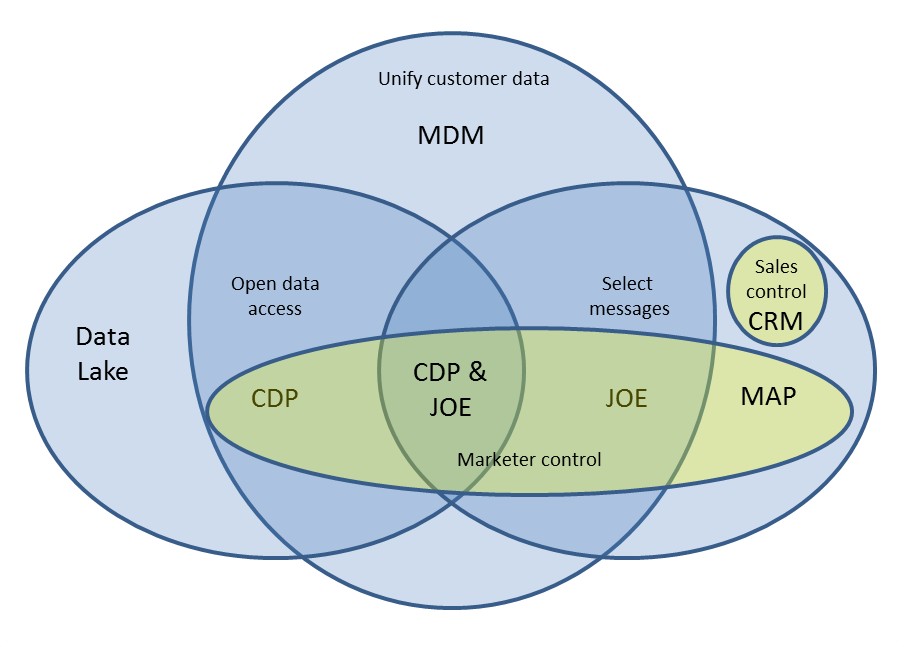
Wondering How Customer Data Platforms Relate to Other Marketing Systems? Here's a Picture


I was asked the other day about the distinction between Customer Data Platforms and Journey Orchestration Engines. My immediate answer was “Some CDPs are JOEs and some JOEs are CDPs. A CDP is a JOE if has journey orchestration. A JOE is a CDP if its data is accessible to other systems. Think Venn diagram with two intersecting circles.”  It's not clear the answer helped, but it did get me thinking about clarifying with a Venn diagram.  The diagram I originally had in mind was this one, showing that CDPs unify customer data and make it available, while JOEs unify customer data and select messages. Systems that do all three are both a CDP and a JOE.


On reflection, that’s not the right way to draw a Venn diagram. Each circle should represent one set of traits. So the picture should really look like this:


That's fine, but it seems odd that “unify customer data” has no system associated with it. Is there a type of system that just unifies customer data without making it accessible or selecting messages? Come to think of it, there is.  Systems that just do customer matching used to be called Customer Data Integration but I don’t hear that much any more.  Sometimes people talk about Identity Resolution but mostly it seems that Customer Data Integration has been absorbed by the larger category of Master Data Management (MDM) systems, which integrate all kinds of data. So let’s add MDM as the label for that.    
But why stop there?  Let's see how other systems would fit into the diagram. First to come to mind was marketing automation platforms (MAPs), which also select messages (like a JOE) but don’t build a unified customer database or offer open data access. The diagram with MAPs included looks like this:
The next is a Data Lake. It provides open data access like a CDP, but doesn’t build a unified view of the data.  Adding that to the diagram gives us:


Hmm, what about CRM? In many ways its out there with MAP: another system that selects messages but doesn’t build a unified database. So we need to introduce a new split, of marketer-controlled vs. sales controlled. I'll give control a different color for clarity.  Apologies to CRM people that your circle is so tiny; I'm not suggesting anything about the importance of your systems.

Still thinking about control, Data Management Platforms (DMPs) look a lot like Marketing Automation Platforms: they’re marketer-controlled systems that select messages (sort of) but don’t unify data from all sources or provide open access. So unless we want to further subdivide the marketer controlled space, they share the same location as MAPs.
Since control has its own color, Data Lake and MDM jump out as not having an owner. In fact, they’re both typically owned by corporate IT, so we can easily add that circle.
This raises one more question: is there an IT-controlled equivalent of a CDP?  That would be a system that unifies customer data and provides open access but is owned by IT not marketing.  You betcha.  It might be an Enterprise Data Warehouse (EDW) if that has all the access features of a CDP (high speed, flexibility, etc.). But most EDWs don’t meet that standard. So let’s just call it an Enterprise-controlled CDP, or ECDP, if you’re wild and crazy enough to accept a four letter acronym. You’ll remember there’s some debate about whether marketing or IT should really own the CDP.  This doesn't provide an answer but it does give a clearer picture of the question.
I've summarized this information in a table below.  Still confused?  We just posted a answers to Frequently Asked CDP Questions on the CDP Institute blog.  Maybe that will help.  


Thursday, March 16, 2017

Is MarTech Too Important To Leave To The Marketers?

I’m still pondering the relationship between marketing and IT: what it is, will be, and should be. A few new ingredients have kept the pot boiling:

- a chat with Abhi Yadav, founder of Zylotech, a MIT-bred, artificial intelligence-driven Customer Data Platform and message selection engine.  Those roots made it seem a likely candidate for IT-driven purchases, but Yadav told me his primary buyers are marketing operations staff.  In fact, he hasn’t even run into those marketing technology managers everyone (including me) keeps talking about. On reflection, it makes sense that marketers would be the buyers since Zylotech includes analytical and message selection features only used in marketing.  A system that only did data unification would appeal more to IT as a shared resource. Still, Yaday's comments are one point for the marketer-control team.

- a survey from the Association of National Advertisers that found marketers who control their technology strategy, vendors, and enterprise standards are more likely to have a strong return on martech investment. (The study is only available to ANA members but they gave permission to publish the table below. You can see a public infographic here).  That’s two points for Team MarTech.


- a study by IT staffing and services provider TEKsystems that found senior marketers with more advanced strategy were more likely to control their own technology.  The difference wasn’t terribly pronounced but it’s still the same pattern. MarTech is now ahead 3-0.  (I was actually more impressed that 65% of departments with no strategy were in charge. Yikes!)


So far, the game’s a blow out. Marketing is usually in charge of its technology and does better when it is.  A doubter might question if marketers really make better choices or are just happier when they’re in control. I do suspect that IT people would be less confident that marketers are making optimal decisions. Still, there’s no real reason to doubt that marketers are the best judges of what they need.

But the game’s not over. Let's call in a recent Ad Week article about global tech consultancies buying marketing agencies. The article cites Accenture, Deloitte, IBM, KPMG, McKinsey and PricewaterhouseCoopers and notes that each already has huge agency operations.  To the extent that these firms are working with marketing departments, it’s still more evidence of marketing being in charge. But the real story, at least as I read it, is these firms are getting involved because they see a need to integrate marketing technology with over-all corporate technology, just as marketing strategy needs to support corporate strategy.

“The consultants’ bread and butter has traditionally been large IT and business-transformation projects,” says Julie Langley, a partner at fundraising, merger and acquisitions advisor Results International, in the article. “But, increasingly, these types of projects have ‘customer experience’ at their center.”

To me, this is the key. As every aspect of customer experience becomes technology-driven, technology must be integrated across the corporation to deliver a satisfactory experience. Marketing may be the captain, but it’s still part of a larger team. If marketing can be a true team player, it gets to call the plays. But if marketing is selfish, then a coach needs to step in for the good of the whole.

I’ll spare you the extended sports analogy. In concrete terms, if marketing picks systems that only meet marketing needs, then the integrated customer experience will suffer. Worse still, some new tech-driven offerings may be impossible. This could be fatal if other, nimbler competitors deliver them instead. Tech-based disruption is a real threat in many industries. Companies can’t just hope that each department working on its own will yield an optimal solution for the business as a whole.  In fact, they can be quite sure it won't.

That’s why I’m not convinced by surveys showing marketers are happier or get better return on investment when they control their own technology. It’s possible for that to be true and for the corporate to miss larger opportunities that require cooperation across departments. If marketing can take that broader perspective, there’s no problem. If it can’t, IT or another department with enterprise-wide perspective will need to enter the game.

Monday, November 14, 2016

HubSpot Announces LinkedIn, Facebook Partnerships and Free Marketing Automation Edition at INBOUND Conference

HubSpot held its annual INBOUND conference in Boston last week. Maybe it's me, but the show seemed to lack some of its usual self-congratulatory excitement: for example, CEO Brian Halligan didn’t present the familiar company scorecard touting growth in customers and revenues. (A quick check of financial reports shows those are just fine: the company is expecting about 45% revenue increase for 2016.) Even the insights that Halligan and co-founder Dharmesh Shah presented in their keynotes seemed familiar: I'm guessing you've already heard that video, social, messaging, free trials, and chatbots will be big.

My own attention was more focused on the product announcements. The big news was a free version of HubSpot’s core marketing platform, joining free versions already available of its CRM and Sales systems. (In Hubspeak, CRM is the underlying database that tracks and manages customer interactions, while Sales is tools for salesperson productivity in email and elsewhere.)  Using free versions to grow marketing automation has consistently failed in the past, probably because people attracted by a free system aren't willing to do the substantial work needed for marketing automation success.  But HubSpot managers are aware of this history and seem confident they have a way to cost-effectively nurture a useful fraction of freemium users towards paid status. We'll see.

The company also announced enhancements to existing products. Many were features that already exist in other mid-tier systems, including branching visual workflows, sessions within Web analytics reports, parent/child relationships among business records, and detailed control over user permissions. As HubSpot explained it, the modest scope of these changes reflects a focus on simplifying the system rather than making it super-powerful. One good example of this attitude was a new on-site chat feature, which seems basic enough but has some serious hidden cleverness in automatically routing chat requests to the right sales person, pulling up the right CRM record for the agent, and adding the chat conversation to the customer history.

One feature that did strike me as innovative was closer to HubSpot’s roots in search marketing: a new “content strategy” tool reflecting the shift from keywords to topics as the basis of search results. HubSpot’s tool helps marketers find the best topics to try to dominate with their content.  This will be very valuable for marketers unfamiliar with the new search optimization methods. Still, what you really want is a system that helps you create that content.  HubSpot does seem to be working on that.

With relatively modest product news, the most interesting announcements at the conference were probably about HubSpot’s alliances.  A new Facebook integration lets users create Facebook lead generation campaigns within HubSpot and posts leads from those campaigns directly to the HubSpot database. A new LinkedIn integration shows profiles from LinkedIn Sales Navigator within HubSpot CRM screens for users who have a Sales Navigator subscription. Both integrations were presented as first steps towards deeper relationships. These relationships reflect the growing prominence of HubSpot among CRM/marketing automation vendors, which gives companies like Microsoft and LinkedIn a reason to pick HubSpot as a partner. This, in turn, lets HubSpot offer features that less well-connected competitors cannot duplicate. That sets up a positive cycle of growth and expansion that is very much in HubSpot’s favor.

As an aside, the partnerships raise the question of whether Microsoft might just purchase HubSpot and use it to replace or supplement the existing Dynamics CRM products. Makes a lot of sense to me.  A Facebook purchase seems unlikely but, as we also learned last week, unlikely things do sometimes happen.

Monday, November 09, 2015

Predictive Marketing Vendors Look Beyond Lead Scores

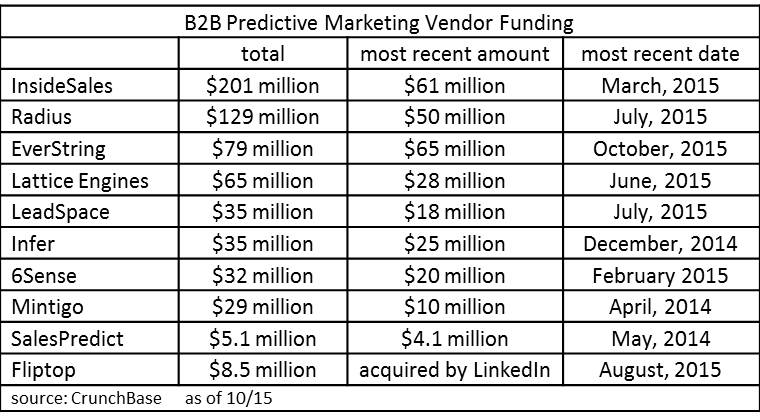
It’s clear that 2015 has been the breakout year for predictive analytics in marketing, with at least $242 million in new funding, compared with $376 million in all prior years combined.


But is it possible that predictive is already approaching commodity status? You might think so based on the emergence of open source machine learning like H20 and Google’s announcement today that is it releasing a open source version of its TensorFlow artificial intelligence engine.

Maybe I shouldn't be surprised that predictive marketing vendors seem to have anticipated this.  They are, after all, experts at seeing the future. At least, recent announcements make clear that they’re all looking to move past simple model building.  I wrote last month about Everstring’s expansion to the world of intent data and account based marketing. The past week brought three more announcements about predictive vendors expanding beyond lead scoring.

Radius kicked off the sequence on November 3 with its announcement of Performance, a dashboard that gives conversion reports on performance of Radius-sourced prospects. What’s significant here is less the reporting than that Radius is moving beyond analytics to give clients lists of potential customers. In particular, its finding new market segments that clients might enter – something different from simply scoring leads that clients present to it or even from finding individual prospects that look like current customers. This isn’t a new service for Radius but it’s one that only some of the other predictive modeling vendors provide.


Radius also recently announced a very nice free offering, the CMO Insights Report.  Companies willing to share their Salesforce CRM data can get a report assessing the quality of their CRM records, listing the top five data elements that identify high-value prospects, and suggesting five market segments they might pursue. This is based on combining the CRM data with Radius’ own massive database of information about businesses. It takes zero effort on the marketer’s part and the answer comes back in 24 hours. Needless to say, it’s a great way for Radius to show off its highly automated model building and the extent of its data. I imagine that some companies will be reluctant to sign into Salesforce via the Radius Web site, but if you can get over that hurdle, it’s worth a look.

Infer upped the ante on November 5 with its Prospect Management Platform. This also extends beyond lead scoring to provide access to Infer’s own data about businesses (which it had previously kept to itself) and do several types of artificial intelligence-based recommendations. Like Radius, Infer works by importing the client's CRM data and enhancing it with Infer's information.  The system also has connectors to import data from marketing automation and Google Analytics.  It then finds prospect segments with above-average sales results, segments that are receiving too much or too little attention from the sales team, and segments with significant changes in other key performance indicators.


Like the Pirate Code, Infer's recommendations are more guidelines than actual rules: it’s up to users to review the findings and decide what, if anything, to do with them. Users who create segments can then have the system automatically track movement of individuals into and out of segments and define actions to take when this occurs. The actions can include sending an alert or creating a task in the CRM system, assigning the lead to a nurture campaign in marketing automation, or using an API to trigger another external action. Infer plans to also recommend the best offer for each group, although this is not in the last week’s release – which is available today to current clients and will be opened to non-customers in early 2016. That last option is an interesting extension in itself, meaning Infer could be used by marketers who have no interest in lead scoring.

Mintigo’s news came today. It included some nice enhancements including a new user interface, account-based lead scores, and lists of high-potential net new accounts. But the really exciting bit was preannouncement of Predictive Campaigns, which is just entering private beta.  This is Mintigo’s attempt to build an automated campaign engine that picks the best treatment for each customer in each situation.

I've written about this sort of thing many times, as recently as this July and as far back as 2013. Mintigo’s approach is to first instrument the client’s marketing efforts across all channels to track promotion response; then run automated a/b tests to see how each offer performs in different channels for different prospects; use the results to build automated, self-adjusting predictive response models; and then set up a process to automatically select the best offer, channel, and message timing for each customer, execute it, wait for response, and repeat the cycle. Execution happens by setting up separate marketing automation campaigns for the different offers.  These campaigns execute Mintigo’s instructions for the right channel and timing for each prospect, capture the response, and alert Mintigo to start again. The initial deployment is limited to Oracle Eloqua, which had the best APIs for the purpose, although Mintigo plans to add other marketing automation partners in the future.


Conceptually, this is exactly the model I have proposed of “do the right thing, wait, and do the right thing again”. Mintigo’s actual implementation is considerably messier than that, but such is the price of working in the real world. There are still nuances to work out, such as optimizing for long-term value rather than immediate response, incorporating multi-step campaigns, finding efficient testing strategies, automating offer creation. And of course this is just a pre-beta announcement. But, it’s still exciting to see progress past the traditional limits of predefined campaign flows. And, like the other developments this week, it’s a move well beyond basic lead scoring.

Thursday, June 11, 2015

Highspot Sales Enablement Helps Sales People Find Content and Marketers Measure What Works

“Sales enablement” is something of a catch-all term for a wide range of solutions that help sales people do their jobs better. Highspot has staked out the corner of this world occupied by systems that help sales people find the right marketing materials. It grew out of the pain that co-founder Robert Wahbe felt which running marketing for Microsoft’s Server and Tools Division, where he found no good tools to help sales people and channel partners find the right materials when they needed them.


When Highspot was founded in 2012, it focused on better content discovery for sales people. But the firm soon learned that this wasn’t enough. It has now redefined its core mission as improving results by showing which content is working.  This is currently measured by tracking how often each item is used by sales people and read by recipients. The July release will supplement this with opportunity information from Salesforce.com CRM, allowing correlation of content usage with funnel stage conversions and revenue.

Highspot mostly does what you’d expect from this sort of system: it lets users load content and sales people, tracks who sends which content to which prospects, and reports on results. Users can set up collections (called “spots”) of materials for a particular product, sales team, funnel stage, region, or any other purpose. They can find content by looking in a spot, by filtering on sales stage, industry, product, and other attributes, or by doing an “intelligent semantic search” that recommends content based on past choices by the user and others. Users can view, download, bookmark or email the selected content or do a live pitch to a prospect. The system automatically adds pitches and emails to the prospect history in Salesforce.  It can also track when a piece of emailed content is opened by the prospect, how long they kept it open, and which pages they viewed. A dashboard can highlight new and featured content. The system will also analyze the inventory of available contents to find gaps or redundancies by sales stage, product, region, etc.

The operational details are all nicely executed, which is probably the most important consideration for a sales enablement system: if it's not easy, sales people won’t use it. But from a technology standpoint, what’s most interesting about Highspot is what the vendor calls “content genomics”. This uses machine learning to examine each piece of content – such as each slide in a Powerpoint deck – and identify properties including text, color, graphs, and images. Different pieces are then compared to find similarities and grouped into “content families”. This approach lets Highspot recognize when a piece has been modified and reused, for example by taking a slide from one deck and adding it to another with some reformatting along the way. Identifying these relationships gives a much more accurate understanding of how often each item is used and how well it is performing. Without this grouping, results from the system could be highly misleading.

Highspot now has more than 100 paying customers. The system is now sold primarily to marketing departments as the system of record for marketing content. There’s a limited function Business Edition and a full function Enterprise Edition, which includes Salesforce integration. Pricing for the Enterprise Edition isn’t published but the vendor says that, once volume discounts are included, it is usually less than the $30 per month per user charged for the Business Edition.

Thursday, March 19, 2015

Everstring Offers Fast, Flexible, Account-based Predictive Models for B2B Sales and Marketing

Remember how much simpler life was back in 2010? Among our quaint notions, we thought that B2B companies couldn’t build predictive models because they didn’t have enough data about their customers and prospects. The Internet has changed that, providing oceans of relevant detail from company Web sites, social media, job boards, and other sources. Today, at least a dozen vendors are offering predictive models for B2B lead scoring, sales intelligence, and customer success management.

Many of the original scoring vendors specialized in a single application.  But today, most are broadening their products to serve multiple purposes. This lets the vendor charge more to each client and blocks out potential competitors. Marketers also benefit since they only have to buy, learn, and integrate a single system.

Everstring is relative newcomer to the B2B predictive modeling arena, founded in 2012 but only seriously entering the market after it received $12 million in Series A funding last August. The late start has let it adopt a broader scope from the beginning, offering both lead scoring and new prospect identification. The company plans to extend its offerings later this year to include real-time treatment recommendations.

But what really sets Everstring apart are two other factors: it works at the account rather than individual level, and it builds models really, really fast – as in, six minutes for a new model once data connections are in place. The two factors are related: Everstring can work quickly because it only imports a client’s account list and sales activities, saving complicated data mapping and analysis, and because it has preclassified its master database of six million U.S. businesses into clusters based on similarities in products, technologies used, hiring patterns, news events, social data, and other factors. This means that building a new model only requires using activity history to identify the client’s responsive accounts and finding which segments have the highest concentrations of those accounts.

That’s pretty light work compared with loading individual level data and identifying which attributes are most predictive for each client’s business. Matching against six million companies rather than 100 million individuals speeds things up too. The approach also lets clients score anonymous leads if IP address or similar information can identify their company. Models for different products can be based built by selecting only accounts that purchased that product.

Once a model is built, Everstring can score any new leads by just by identifying the segment their company belongs to and applying that segment’s score. Lists of new prospects require simply taking names from the highest-scoring segments.

Sounds pretty simple, eh? That’s because I’ve over-simplified. The data gathering and actual math are actually quite complicated.  Beyond that, Everstring does more than provide segment scores, which  measure the fit between a new account and the client’s previously responsive prospects. Specifically, it also measures purchase intent by based on more than 1 billion clicks per day on third party Web sites and emails. And it measures engagement by analyzing visitor behaviors on the client’s own Web site, gathered through a tracking pixel, plus other data imported from marketing automation. The combination of fit, intent, and engagement will guide the real-time treatment recommendations and can support additional scoring applications.  Fit scores alone are much more limited..

So, how do you deploy all this? Everstring has standard integrations with Salesforce.com, Marketo and Oracle Eloqua, which can send data for the initial model building and score new accounts as they are added to those systems. A real-time API can integrate with other CRM and marketing automation systems.

Pricing for Everstring is based on the types of models and volume. Lead scoring usually runs from $60,000 to $100,000 per year. New prospect names is additional. Pricing for real-time message selection isn’t yet set. The system currently has about 25 clients, nearly all added since last August.


Wednesday, February 25, 2015

Will New Marketing Automation Tools Let Sales Climb Back Up The Funnel?

Trends are signposts to the future: they point to where we’re headed. But the signposts are unreliable because trends are often interrupted – the classic example being the “Great Horse Manure Crisis of 1894”, when experts predicted that major cities would soon be buried beneath horse droppings. I’m beginning to suspect the much-cited trend of marketing playing a larger role deeper into the sales funnel has reached a similar peak. If the pendulum is really swinging the other way, then sales people will be taking a more active role earlier in the buying process.

This particular thought emerged quite unexpectedly during a vendor briefing yesterday. The talk had turned to the industry in general and I was ticking through my usual list of trends – external data, predictive modeling, sales enablement, advanced attribution, adtech and martech integration, local/partner marketing systems, all-in-one systems, content creation support, and of course customer data platforms. But I also had in mind another system I had just seen, MDCDOT, which gives marketing automation functions to sales people. For some reason, I suddenly saw a connection of this to external data: if vendors like NetProspex and InsideView could provide sales people with prospects and vendors like MDC provide tools to nurture those prospects, then sales people really don’t need marketing to do either of those things. Sales could then push marketing back to its traditional narrow role of generating promotional materials and doing research. That's pendulum swinging with a vengeance.

Once an idea like that pops up, supporting arguments quickly fall into place.  Integration of advertising with marketing technology potentially gives sales people another route for generating their own prospects. Advanced data enhancement and lead scoring make it easier for sales people to automate lead nurture processes without becoming marketing automation experts. All-in-one systems and customer data platforms both unify marketing and CRM technologies, making it easier to shift boundaries between marketing and sales responsibilities.  Those shifts could be permanent or vary dynamically based on fluctuations in needs, resources, and individual interests. Sales enablement tools like Velocify and Clari help salespeople pick the right treatment for each prospect, which can include sending them to automated campaigns.

In short, the conditions may be ripe for a counter-revolution: a sort of Terminator 2-style conversion where some machines defend the humans instead of trying to replace them. It even dawns on me that having marketers restrict their focus to content creation has some advantages, given how much more content is needed these days.

Let me be clear: this is a shiny new idea which could quickly lose its luster. It only applies in B2B and considered-purchase B2C relationships where actual salespeople are involved in the buying process. And it may be that most salespeople are happy to let marketers handle the lead generation and nurturing, which they never enjoyed in the first place. Or perhaps corporate management will decide it’s more effective and safer for marketing to handle those tasks, regardless of what sales people want.

On the other hand, sales departments are usually much larger, more powerful, and better funded than marketing departments, so it could be in the marketing automation vendors’ interest to serve sales people directly. This leads to the long-expected assimilation of marketing automation into CRM, a trend that has never quite happened but might finally take place.

Or maybe the future is really about machines selling to other machines, and the whole distinction between sales and marketing will no longer matter. Only time will tell. In the meantime, bear in mind that you never know whether a signpost is correct until you’ve passed it.*
__________________________________________________________________________________________
*I don’t know what that means, either, but it sounds pretty deep, don’t you think? I can definitely see the motivational poster.

Friday, October 24, 2014

SalesPredict Offers Highly Automated, Highly Flexible Predictive Modeling

A couple of weeks ago, I wrote that “predictive everywhere” is one of major trends in data-driven marketing.  I meant both that predictive models guide decisions at every stage in many marketing programs, and that models are used throughout the organization by marketing, sales, and service.

I might have added a third meaning: that systems to do predictive modeling are everywhere as well. SalesPredict is a perfect example: a small vendor with a powerful system that just launched earlier this year. Back in, say, 2008, a product like this would be big news. Today, I simply add them to my list and try to understand what makes them different.


In this case, the main technical differentiator is extreme automation: SalesPredict imports customer data, builds models, scores current records, and deploys the results with virtually no human intervention.  This is possible primarily because the painstaking work of preparing data for analysis – which is where model builders spend most of their time – is avoided by connecting to a few standard sources, currently Salesforce.com and Marketo with HubSpot soon to follow. Because it knows what to expect, the system can easily load customer data and sales results from those systems.  It then enhances the data with business and demographic information from public Web pages, social profiles, and third party sources including Zoominfo, InsideView, and Orb Intelligence.  Finally, it produces models that rank customers based on how closely they resemble members of any user-specified list, such as customers with deals that closed or who failed to renew.  Results appear as lists in a CRM interface or as scores on a marketing databaset. The whole process takes just a few hours from making the Salesforce.com connection to seeing scored records, with most of the time spent downloading CRM data and scanning the Web for other information. Once SalesPredict is installed, models are continuously updated based on new CRM information and on feedback provided by users as they review the scored records. This enables the system to automatically adjust as buyer behaviors and conditions change.

User interface is a second differentiator. CRM users see a ranked list of customer records with a system-assigned persona derived using advanced natural language processing, suggested actions such as which products to offer, and the key data values that influenced the ranking.  Users can drill further into each record to see more customer and company information including previous interactions, products owned, and won or lost deals. The company information is assembled from internal and external sources using SalesPredict’s own matching methods, so results are not at the mercy of data quality within the CRM. As previously noted, users can adjust a ranking if they feel the model is wrong; this is fed back to the system to adjust future predictions. Another screen shows which data values are most powerful in predicting success.  This helps users understand the model and suggests criteria for targeting increased marketing investment. Although there’s no great technical wizardry required to provide these interfaces (except perhaps the name and account matching), they do make results more easily understood than many other predictive modeling products.

The final differentiator is flexibility.  The system can model against any user-defined list, meaning that SalesPredict can score new leads, identify churn risk, or find the most likely buyers for new products. Recommendations also draw on a common technology, whether the system is suggesting which products a customer is most likely to buy, which content they are most likely to download, or which offers they are most likely to accept. That said, SalesPredict’s primarily integration with Salesforce.com, user interface, and company name itself suggest the vendor’s main focus is on helping sales users spend their time on the most productive lead.  This is somewhat different from predictive modeling vendors who have focused primarily on helping marketers with lead scoring.

Is SalesPredict right for you? Well, the automation and flexibility are highly attractive, but the dependence on CRM data may limit its value if you want to incorporate other sources. Pricing was originally based on the number of leads but is currently being revised, with no new details available.  However, it’s likely that the company will remain small-business-friendly in its approach. SalesPredict currently has about 15 clients, mostly in the technology industry but also with some in financial services and healthcare.

Thursday, September 26, 2013

Customer Data Platform Guide Reviews Tools to Build Marketing Databases

Raab Associates’ new Guide to Customer Data Platforms is now available [update: as of 2014, we no longer sell it].

You may not find that news to be fall-off-your-chair exciting. In fact, you’re more likely to wonder whether the world needs yet another report on anything at all. Fair enough. So before telling you what’s in the CDP Guide, I'll tell you why it exists.

Simply put, marketers need better databases. If you’re a working marketer, you almost surely know this from personal experience. But someone who only read industry news and vendor promotions might think all anyone had to do was to plug in the latest cool application and it would immediately be filled with fresh clean data like water from a tap. Dirty big data is our industry’s dirty little secret.


The problem isn’t new but it is getting worse. As customers interact across more channels, marketers need to not just meet them in every new location but recognize them and carry on a continuous conversation from one touchpoint to the next. Marketers can also become more effective by enriching that conversation with information from external sources such as Web pages, social media, and commercial databases. Both the carrot of better results and the stick of customer expectations are ever-more-urgently driving marketers towards building better databases.

The good news is that plenty of smart vendors have also recognized this need and are trying to help marketers on their journey. I call their systems Customer Data Platforms and define them as “a marketer-controlled system that supports external marketing execution based on persistent, cross-channel customer data.”

If there’s one absolutely critical point in that definition, it’s that CDPs put marketers in charge of building their own database. Taking control is the only way that marketers will ever get the databases they desperately need. It’s why CDPs are so important.

But too few marketers know who the CDP vendors are, what they do, and how they differ. The Guide to Customer Data Platforms is designed to provide this information. If the CDP vendors are tour guides on the path to better data, the CDP Guide is the reviews you read to decide which one you’ll hire. As far as we know, no other study serves this purpose.

Given its goal, the heart of the Guide is the vendor profiles: three to five pages on each vendor, describing capabilities for data management, predictive modeling, marketing campaigns, and message delivery, plus background on the vendor’s technology, clients, company history, and pricing. You’ll want to read those closely when you’re selecting a vendor. But first you’ll have to decide whether a Customer Data Platform is something to consider. Here is some information to help make that judgment.

- CDPs are something new. CDPs are systems that help marketers build and update customer databases, and make those databases available to support marketing programs. That may not sound very new, but most B2B marketing automation products today build very limited databases while most B2C marketing automation products rely entirely on an external data warehouse. The systems that do build databases are designed to be used by IT departments, not marketers. And many CDPs provide predictive modeling or best-treatment recommendations that go well beyond the storage functions of a basic data warehouse.

- You still can’t do this at home. CDPs may be tools for marketers, but that doesn’t mean that marketers build the databases themselves. Rather, CDP vendors provide services that build the database with varying degrees of marketer involvement. The difference is that the marketers work directly with the CDP vendors, instead of relying on IT staff that often has other priorities and an imperfect understanding of marketing needs. This makes it much easier and quicker for marketers to get the database they need.

- CDPs are an outgrowth of existing system types. Most CDP systems were created for a purpose that happened to require the same database-building capabilities as a CDP. These purposes fall into three groups which I discussed in last week’s post, so I won’t repeat them here. They’re worth understanding because vendors in each group have a different set of skills, one of which will probably come closest to your needs.

- Convergence is coming. Even though the CDP vendors started with different applications, their shared abilities for identity matching, database management, analytics, and integration will allow them to support more of the same functions over time. As marketers understand the value of their databases more clearly, CDP vendors will be able to focus on selling their data platform features rather than applications the platform supports. Of course, once the platforms themselves are common, vendors will climb the value chain by offering better predictive analytics and cross-channel treatment optimization.

- Details count. CDP features may eventually converge, but for now the systems differ in many small ways that make a big difference. To take one example, nearly every CDP creates predictive models. But some can only predict response to specific promotions, based on who has responded before. Others can do the much more sophisticated analysis needed to predict which offer will best advance a long-term goal such as becoming a new customer. And even among those that model against long-term goals, some can actually estimate the incremental impact of a specific offer and others can just see most common correlations. We found similarly subtle differences in how data is collected (via the vendor’s own Web tags or by importing from other systems), the range of data sources (just marketing automation and CRM or those plus many others), natural language processing to extract useful information from text sources such as Web pages, how much history is kept and how it’s used, program execution, and end-user control. The CDP Guide clarifies these distinctions, but it’s still up to marketers to evaluate which differences will matter in their own business.

The CDP Guide itself contains quite a bit of other useful information, including a formal definition of CDPs, detailed explanations of what to look for in a CDP, and a history of marketing databases starting with ancient Sumer (don’t worry, I skipped the boring parts). Again, the goal is to provide one package with everything you need to get started along the path of buying a CDP system.  From there, it's up to you.

Wednesday, September 11, 2013

How Raab Associates Converted to ZohoCRM In One Weekend: a B2B CRM Success Story

Raab Associates is really two businesses: the technology consulting practice run by Yours Truly, and a marketing agency specializing in children’s books run by my beautiful and brilliant wife Susan. We keep them largely separate, but I am inevitably involved in her technology decisions. So when her ancient Goldmine CRM system finally crashed last week, we both scrambled to pick a replacement.

From my usual lofty perch in enterprise software world, Susan's requirements seem stick-figure simple: accounts, contacts, opportunities, lists, and mass emails. So our first thought was to find a system that offered those plus some cool new things like social media profiling. But a quick scan of the market showed that none of the neat new systems also offered the basic functions with with enough refinement and flexibility to meet Susan's needs.

This pushed us back to the more standard CRM options.  To my dismay, we found ourselves ruling out one after another for various. I even briefly suggested we reconsider Goldmine, an thought that was quickly rejected.  Eventually we took an unhopeful look at ZohoCRM, which I know as a popular small business system but had never considered particularly advanced. Happily, the system has a very thorough online user manual, so I was able to check it out in detail.

Even more happily, the answers all came back positive as I imagined working through Susan’s basic business processes in Zoho. Build contact lists, check. Mass emails, check. Opportunities linked to campaigns, check. Pull-down status list and callback date on opportunities, check. Custom filters across all field types, check. End-user report writer, check. Multi-field search, check. A bunch of other details that I no longer recall, check check check. Reasonable cost, double check: we would have grudgingly paid a couple hundred dollars a month for a solution, but Zoho’s mid-tier Professional edition costs all of $20 per month with no limits on database size (Susan has about 14,000 contact records – well above the minimum for many small business systems). We may even splurge for $35 per month enterprise edition, which provides some advanced automation features but is probably overkill for most small businesses.  Just call me Diamond Jim.

At this point, we were ready to sign up for the free trial account, which was a simple process and didn’t ask for a credit card. Let me point out that I purposely hadn’t signed up sooner because I didn’t want to waste time exploring a system that I wasn’t pretty confident would meet my needs. Diving in too soon is a classic mistake among software buyers – and, in this instance at least, I actually followed my own advice.  (While I'm patting myself on the back, I'll also point out that we evaluated the software against our actual business process, not an arbitrary feature checklist.  That's another best practice that too few buyers follow.)

We now pulled a small set of test records from Goldmine to test the import function. The online manual guided me through the exact steps necessary, complete with a handy checklist of preparatory tasks.  When I went to load the file itself, I got the first of many delightful surprises: Zoho took a guess at mapping the input fields, based on their names, and got about half right. That’s a pretty sophisticated function and a big time-saver. It’s the sort of refinement you don’t see in a new system because it’s not essential to get the product into market, but gets added after enough users request it and the developers have some breathing room. Zoho has actually been around since 1996 (although CRM came later), so they’ve had time to add a lot of those little helpers.

In any event, the test import worked perfectly the first time out, which was a great feeling of accomplishment. Susan and I played with the system a bit more now that we had some real data in it, and found all sorts of nice little options, like being able to rename objects (she calls an opportunity a “pending record”), rearrange the fields on each screen, change the order of sections, and move fields from one section to another.  Again, none of these is cutting edge, but they’re not always available and make a big difference in making the system more usable.  The interface itself was also highly intuitive – lots of nice dragging to move the fields around, for example. There were plenty of other unexpected goodies that I would have otherwise needed to configure or live without, like automatically listing the associated contacts when you view an account record, and listing the associated opportunities – I mean, pending records – when you look at a contact. And, oh yes, you can control which fields are displayed on those related records.

At this point we were feeling pretty good about actually pulling off the conversion, so I spent all day Sunday manually cleansing those 14,000 contact records to ensure the critical data was populated. Even Zoho couldn’t help with that one. I finished around midnight and had a moment of panic when I saw that Zoho would only import 5,000 records at a time.  But it turned out to accept all three batches without waiting for the first batch to finish, so I was able to submit them and get some sleep.

I woke up bright and early (well, actually, late and cranky), feeling pleased that Susan could start using the system without missing a business day.  Alas, we found that somehow there were twice as many account records as expected. A quick call to Zoho support pointed us to a rollback function that should have cleaned up the problem in a few seconds. Sadly, it rolled back one set of records but not the other (remember, there had only been one import).  I spoke again with Zoho support, who promised to look into it but hadn’t accomplished anything several hours later.  At that point, I realized – duh – that it would take about two minutes to delete the records manually (you can only delete 100 at a time, but it’s three keystrokes for each batch, so you can probably do about 50 batches per minute). Once I figured that out, I cleaned out the old records and reimported everything, and we had a clean set of data.

Susan has been working with the system for the past two days, and I’ve been peeking over her shoulder and poking around a bit myself.  ZohoCRM is certainly not perfect – there are bunch of little things she would like to do, such as preview a template-based email with the variables populated. There are also some oddities like two unrelated sets of email templates, a vestige of Zoho's earlier separate systems for CRM and mass mailings. Those quirks take a bit of getting used to but are far from show-stoppers. There are some other tasks that cumbersome at the moment, but I suspect we’ll be able to automate once we have time to explore those functions. And, yes, there are some things it doesn’t do that Susan would like, such as associating multiple email addresses with the same contact. I wouldn’t exactly say they’re trivial – certainly not to Susan – but she can live with them.

We're generally satisfied with customer support: phone calls aren’t always answered immediately, but after about a minute on hold, a very nice lady picks up the line and offers to take a message. I appreciate the human touch, and, more important, the opportunity to get immediate help if something is truly urgent. We do get callbacks in an hour or two and the agents have been pleasant and helpful, which is about all I can ask. There’s a “how’d we do?” email after each interaction, which is a good sign that Zoho is trying to do a good job.

Bottom line: We’re still in the honeymoon period, so I may find Zoho isn’t really as great as I think.  On the other hand, I proposed to Susan almost immediately after meeting her and that's worked out just fine.  So I'd say ZohoCRM is worth a close look for small business CRM, even for people who think it may be too simple for their needs.

Wednesday, August 07, 2013

NICE Buys Causata to Extend Its Customer Experience Management Position

So, there I was around 7:30 Eastern time this morning, sending out reminder notices to vendors I need to interview for an upcoming report on Customer Data Platforms. I received an immediate response from the Kevin Nix of Causata, offering to talk that very morning. This seemed a bit odd – Causata is based in San Francisco, so it was 4:30 a.m. local time and most people need more notice to schedule a call. But I had Things To Do, so I didn't give it much thought. Then, at the end of another call, a participant casually mentioned that Causata had just been purchased by Israel-based NICE Systems.  At first I was struck by the coincidence, and then realized what had happened: Nix was up because he had been talking to the folks in Israel, and he replied because he wanted to discuss his acquisition, not my report. [Insert image of deflating self-importance].


Sure enough, when I did dial in, I was treated to a prepared briefing on why NICE had made the deal.

There’s really nothing wrong with that. NICE is little-known in marketing circles, although I had bumped into them previously when they bought decision management vendor eGlue in 2010. But NICE is a major player in contact center systems, with nearly $1 billion revenue and $2.5 billion stock market capitalization. So I was pleased to connect with them directly and learn a bit more.

The briefing itself was interesting too. It turns out that while NICE still sells primarily to contact center managers, it is working hard to expand to clients in marketing, sales, compliance (it bought Actimize in 2007) and other areas related to customer experience. Its interest in Causata related to all  that, and in particular to that fact that Causata can capture Web interactions in real time and present them with related recommendations to contact center agents and other systems. This pumped me back up a bit, since it can be read as validation of the Customer Data Platform concept that I’ve been developing, which is about exactly this need to make customer data easily available across platforms. In fact, Causata was the original example I used to introduce the idea.


But enough about me, at least for the moment. The idea of NICE expanding to become an all-channel, all-department customer experience vendor immediately raises the question of how they’ll compete with all those other omni-everythings approaching from digital marketing (Adobe), B2B CRM (Salesforce.com), and general enterprise systems (Oracle, SAP, IBM). The contact center world has actually been a font of decision management systems, most notably Chordiant (now part of Pegasystems) and Infor Epiphany. So it’s certainly possible that they will be another source of competitors converging on the market for integrated customer experience management solutions. Like the CRM and Web content management vendors, the contact center firms start from a strong customer and financial base, making them formidable contenderss in what will surely be a long battle for high stakes.

I haven’t formed a solid opinion yet on how NICE in particular or contact center vendors in general are likely to fare in this new arena. But they are definitely something to factor into future assessments.

Wednesday, July 03, 2013

Venntive Adds Communities to Small Business Marketing Automation and CRM

It has taken me some time to form a clear picture of Venntive. It is clearly “all-in-one” sales and marketing software for small business, combining marketing automation, CRM, and ecommerce along the lines of Infusionsoft and Ontraport (formerly OfficeAutoPilot). It also includes full Web site management and social media monitoring and posting, but those are natural extensions for sales and marketing.  More puzzling was Venntive’s decision to include a full accounting system and a community management features such as private discussion forums, Wikis, events, and custom fields for groups within its database. The other micro-business systems have avoided accounting, presumably because they saw little value in trying to displace Intuit QuickBooks. And community management – well, that just doesn’t have much to do with how most small businesses operate.

The hint at an answer – a giant flashing neon sign, actually – was in Venntive CEO Lydia Sugarman’s description of its client base, which my notes recorded as “chambers of commerce, schools, Boy Scout troops, coaches, law firms, financial advisors and associations”.

You can be certain that this is the first time “Boy Scout troops” has come up as a category of marketing automation users. But Venntive makes perfect sense once you consider their needs.  A scout troop has many subgroups that need to communicate among themselves: how better to manage that field trip to the National Duck Stamp Museum?  They also have simple finances and simple Web sites. Venntive’s pricing model – starting at $25 per month for up to 1,000 contacts, with unlimited email – also fits a small organization without a big prospect list, since it would pay about that amount for basic email and Web hosting.

In fact, Sugarman said the custom fields for groups were originally added to track Boy Scout merit badges – although they’re now used more often for things like dealer certifications.

Venntive's scouting heritage notwithstanding, I want to make clear that it is suited for much larger organizations.  Venntive offers the full set of “all-in-one” system features, meaning it can serve the full set of “all-in-one” clients: those coaches, law firms, financial advisors, and others that Sugarman mentioned, plus online retailers, service companies, and small manufacturers. In fact, Sugarman said most of the company’s clients are B2B not B2C marketers.

One problem with writing about a system like Venntive is evaluating its huge number of features.  In some alternate universe where sleep is optional, I would have explored each function in depth before writing about it. But things don’t work that way on my little corner of planet Earth.  The best I could do was take a whirlwind tour of the system and capture some screenshots. Based on that limited research, I came away impressed with the sophistication of the features as well as their scope.

Let’s start with the group functions, since groups are such a key component of Venntive. At the simplest level, a group is just a list. People enter groups in the usual ways: email or form response, user-defined filters, conversion events, list import, or manual assignment. Entry can trigger an email, assignment to a drip campaign, or sales agent notification. So far pretty normal. But groups also support those community and collaboration features.  Members can share discussion forums and Wikis and be assigned rights such as access to specified information about each other. Each group can also have a parent organization, member log-in, physical location, custom fields, and its own settings for email, event, and drip campaign practices. Beyond membership organizations, those group functions could support all sorts of peer-to-peer communications, arguably making Venntive just the thing for cutting-edge, community-driven marketing.


Looking at the other functions:

- emails can be built on user-customizable system-provided templates, on imported templates, or from scratch.  They can include social sharing buttons, surveys, event links, contact data, or dynamic content selected by embedded if-then rules. Completed email can be previewed and spam scored. The system can automatically assign recipients to different groups based on their response (read, click, forward, or take a survey).

- surveys are built from a list of independent questions.  This means all answers to the same question are automatically placed in the same data field, regardless of where the question is asked. That’s the right way to do it, at least in my opinion.

- events can be either physical or on-line. The system stores details about the location, captures registrations, collects fees, offers multiple options for reminder emails and text messages, and reports on actual attendance after the fact.

- CRM goes beyond the basics (contact attributes, activity history, calendar reminders) to track opportunities and sales quotes, allow searchable tags for segmentation, and store files associated with a contact. Standard integration with RapLeaf let users add demographic, interest, and purchase data from external sources by matching on email address.

- lead scores are created in two ways: conventional user-created scoring rules, and automated predictive modeling. There are two conventional scores, one for activities and one for demographics.  The demographic score is based on contact attributes, while the activity score incorporates contact activities (email, Web, event, survey, purchase, and social behaviors) plus salesperson activities (sent an email, left a messages, etc.).  Activity values can be set to decay as time passes, which is one hallmarks of advanced lead scoring. While there's just one pair of conventional lead scores, users can have as many predictive model scores as they want.  Each score predicts visits to a different Web page, typically representing a stage in the purchase process. The system automatically looks at the demographic, activity, and CRM data to build a model formula and score the contact records.

- campaign features in Venntive are uncharacteristically limited.  Users can set up a sequence of emails, but there is no branching based on response and emails are the only action a campaign can control directly.  Users gain a bit more power from the ability of email response rules to assign contacts to different categories.  But this is still far from the process automation that adds great value to other micro-business systems. 

- Social media support includes keyword searches and alerts; real-time or scheduled posting to multiple Twitter, LinkedIn and Facebook accounts; and detailed tracking of results. This is a reasonable set of features for a small business system.

- The Web site builder is much more robust.  It supports pages, blogs, member sign-in, stores, coupons, advertising, support tickets, and tracking via Google Analytics. Users can assign point values to specific pages for use in lead scoring and can see a list of who visited each page. Venntive hosts the Web site for its clients, but clients can assign their own Web address to hide this.

- Financials include account tracking, journal entries, receivables management, and reporting. Invoices are automatically added from CRM and Web orders and funds can be collected via PayPal. The system can also integrate with QuickBooks.

- There’s also project management, a media library, SMS messaging, and print integration. And probably other things I haven’t mentioned.

Given the depth of its features, Venntive’s interface is reasonably straightforward. But there's a lot to learn and users will need help.  Each screen include buttons for on-demand videos explaining individual functions. There are also video tutorials and non-video explanations (using a technology called "text") for users over age 30.

Pricing of Venntive is based primarily on the number of contacts in the system, starting at $25 per month for 1,000 contacts. A system with up to 25,000 contacts would be $200 per month. There are some additional fees for extra users, Web analytics, SMS messaging, and external data. Users can send unlimited emails.

Venntive was launched in 2006 and is nearing its 1,000th client.

Thursday, June 27, 2013

Adobe Buys B2C Marketing Automation Leader Neolane: One Gap Filled, But Where's CRM?

Adobe today announced plans to acquire Neolane, the largest remaining independent B2C marketing automation vendor (excluding email-focused providers like Responsys and Silverpop). Price was $600 million, which is roughly in line with the 8x revenue paid for ExactTarget and Eloqua recently.  (Neolane announced $58 million revenue in 2012 and has been growing around 40% per year, which would yield about $80 million 2013 revenue.)

The deal is not particularly surprising. Adobe was on everyone’s list of potential buyers, and Neolane was ripe for acquisition or an initial public offering. It reinforces suspicions that Adobe was the mystery bidder for ExactTarget mentioned last month by Salesforce.com.  Indeed, my take on the ExactTarget deal explicitly mentioned an Adobe/Neolane possibility. That frankly didn’t take much insight, but I’ll brag a bit more about having pegged Adobe as needing to add marketing automation as far back as this post in 2009 and again in 2010.

Neolane is more of a mid-tier solution than an enterprise product, which may be a slight mismatch with Adobe.  I’d say that reflects a lack of enterprise systems available for Adobe to purchase, more than any particular desire to target the mid-market.

Predictable or not, this deal does fill a gaping hole in Adobe’s marketing cloud. It still doesn’t put Adobe on equal footing with Oracle, Salesforce, SAP or Microsoft, since they all have major CRM platforms which Adobe does not. Adobe obviously has a leadership position in content creation, although I’ve never felt that does much good in selling customer management systems. (To be more precise, content creation COULD give Adobe an advantage if it very tightly coupled auto-personalized marketing treatments with content creation, but that doesn't seem to be happening.)

More important, Adobe also has an unmatched position in Web analytics, Web advertising, and Web content management. In fact, adding Neolane gives it a profile very similar to IBM, which also has strong Web and marketing automation products but not CRM (and which also shares Adobe’s digital-is-everything mono-vision).

Come to think of it, the contrast still comes down to the dueling strategies I described in 2011: Web-plus-marketing automation (Adobe and IBM) vs. CRM-plus-marketing automation (Oracle, Salesforce, SAP, Microsoft). Everything will eventually converge Web-plus-CRM, with marketing automation baked in so deep you can't see it.  But that’s still some way off, except arguably for Oracle, which has all the pieces but hasn’t fully integrated them. In the meantime, we’ll see which approach is more popular – and what becomes of the stand-alone marketing automation vendors who are caught in between.

Wednesday, May 08, 2013

HubSpot Releases Social Inbox and Reveals So Much More

I spent yesterday afternoon at HubSpot’s “Open House” in Cambridge, MA, during which they briefed the community on their business progress, introduced their new Social Inbox, described their  approach to marketing and sales alignment, explained their “culture code”, and answered questions.

The most concrete news, Social Inbox, extends existing HubSpot features by more fully integrating social media monitoring and response with the HubSpot interface. The Social Inbox presents a list of Twiter posts by user-specified individuals or containing specified key words. Users can drill into each post to see a complete profile of the poster. The big deal in HubSpot’s eyes is the profiles include all information the HubSpot database about each person, and are even color-coded with the sales lead stage. The data includes Web and email behavior captured directly in HubSpot, data imported from Salesforce.com, and whatever else the system has available. Users can respond directly, forward a post to someone else, or add the poster to a HubSpot campaign. The system can automatically alert users to new Tweets as they happen or on a regular schedule.


HubSpot said they couldn’t find any other product that combines this type of social monitoring with access to such deep profiles. I can’t immediately think of one either, although it might exist. Either way, uniqueness is less important than the value provided, which is considerable.

What’s ultimately more interesting, however, is that Social Inbox is aimed at managing one-on-one interactions between users and individual contacts.  This sort of contact management is quite different from HubSpot’s traditional focus on attracting inbound traffic or even from conventional marketing automation.

The new features came up again later in the day, when the audience asked several pointed questions about whether HubSpot would eventually add a full CRM capability. This caused by far the most discomfort of any topic addressed by a management team which provides itself on transparency. Answers ranged from a coy “we think about a lot of things” to a fairly definitive stream of conscious listing of the arguments against adding CRM.  The currently dominant line of thought seems to be that HubSpot already provides adequate features for clients who want light contact management, while adding full CRM features would only lead to a losing battle with Salesforce.com. Unstated but hovering in the background was the fact that Salesforce.com is an investor in HubSpot and might some day consider buying them to expand its own marketing scope. CRM would make HubSpot less attractive to Salesforce, since it would create a set of redundant features that need to be supported or removed.

But the most fundamental reason that HubSpot management seems genuinely disinclined to add CRM is that they see HubSpot’s mission as transforming marketing. There’s a distinctly messianic gleam in CEO Brian Halligan’s eyes when he says this and the vision is no doubt shared widely across the company. In fact, it’s arguably more surprising that HubSpot has overcome its marketing focus to introduce the contact management features already in place. My take is that customer needs – another HubSpot mantra – have driven the system in this direction despite management reluctance. The system has a will of its own.

Admittedly, I’ve been arguing this for a long time: the need for integrated customer treatments will eventually lead marketing automation, CRM, and Web content management to become a single system, or at least to share a common customer database. HubSpot’s current vision of highly personalized data-driven marketing is consistent with this. The current vision is also quite different from the original HubSpot vision of attracting traffic through huge volumes of great (but not personalized) content. But the new vision is a logical extension of the original: once you’ve attracted people and start to learn their preferences, the more you’re able to make targeted content recommendations. And, the more content you have available, the more you need those recommendation to point people at the right materials.

This brings HubSpot right back to contact management, because the same data used to recommend marketing content can, and should, be used to recommend treatments during personal interactions. It’s possible to simply push recommendations to an external CRM platform, but setting a connection for each point of contact quickly becomes a lot of work. The temptation to eliminate that work by building an integrated CRM system is hard to resist.  As I say, the system has a will of its own.

Incidentally, there is another way to look at this. The traditional view sees marketing as making automated contacts, while sales and service use human agents, supported by CRM, for individual interactions. This is why CRM seems foreign to a marketing system. But the automated-vs-human division is no longer so clear cut. Social media marketing is mostly done by humans through one-on-one messages, while many sales and service interactions are automated. In this view, HubSpot needs contact management features even if it rigorously restricts itself to serving marketers alone.

The problem with this approach is that it denies sales and service the benefit of HubSpot’s data and customer understanding – a terrible waste of corporate resources. So this view also pushes HubSpot towards a unified marketing and CRM system, or at least a database and recommendation engine that’s accessible by both HubSpot and a separate CRM. I swear I didn’t mean to end up here, but this does lead to the Customer Data Platform I’ve been discussing over the past few weeks. I don’t think HubSpot management wants to move in that direction, or even that they necessarily should.  But these things have a will of their own.